

Artificial intelligence is rapidly transforming how developers approach coding tasks, and Cursor AI is one of the tools that aims to improve the way we code by offering powerful AI integrations. One of Cursor AI’s standout features is its ability to customize and apply AI rules to different coding environments, enhancing the precision and efficiency of your code generation process.
In this guide, we’ll walk you through everything you need to know about creating AI rules for Cursor AI, from what they are to how they can be applied. Cursor has changed how project rules are stored since this guide was first written, so we’ve updated the steps below to match the current .cursor/rules format. By the end, you’ll have the knowledge to enhance your development workflow with personalized AI rules, allowing you to reduce repetitive work and increase productivity significantly.
What Are AI Rules in Cursor AI?
AI rules in Cursor AI are customizable instructions that you provide to the IDE to improve how it assists in coding tasks. These rules guide the AI in generating code, formatting it according to your preferences, or following specific development conventions for better integration into your projects.
AI rules are particularly useful when working with different coding languages and frameworks, allowing you to define specific behaviors. For example, if you’re working with JavaScript, React, Firebase, and Python, you can set rules that instruct Cursor AI to follow a particular coding style or adhere to specific project guidelines. This provides more personalized, accurate, and consistent code generation, minimizing the need for manual corrections.
In addition to consistency, AI rules can also be used to ensure that best practices are always followed, such as setting strict security protocols or formatting guidelines. This flexibility allows developers to adapt Cursor AI’s behavior to the evolving needs of a project, providing a more seamless integration and improved collaboration between AI and developer.
Setting Up AI Rules in Cursor AI
To begin creating custom AI rules, start by navigating to the Cursor AI settings. This is where you will set your global and project-specific rules, enabling you to tailor Cursor AI to your coding needs effectively.
- Click on Settings.

- Scroll down to Rules for AI.
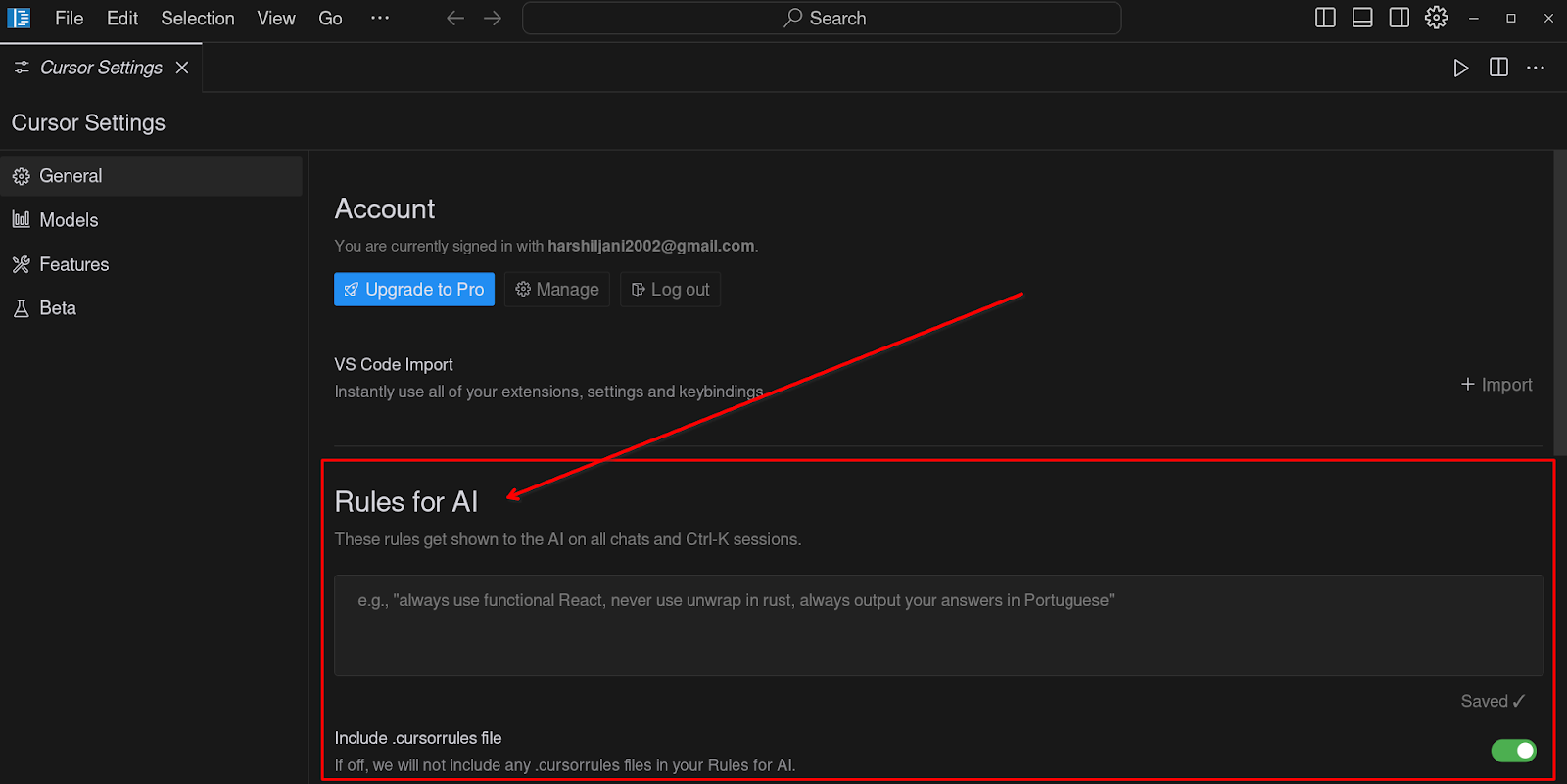
This is where you can begin adding custom instructions that the AI will use when generating code for your projects. You can make these rules as general or as specific as you like, depending on the project.
Once you have opened the settings, you will see various options that allow you to customize the AI’s behavior in different ways. This is the right place for rules you want applied to every project, often called User Rules. For rules that should only apply to one repository, Cursor now uses project files instead of a settings screen; we cover the current file-based setup in the “How to Create Project Rules with .cursor/rules” section below.
From better AI rules to better AI adoption
Cursor AI rules can make individual developers faster and more consistent. For teams, the bigger challenge is turning AI-assisted work into repeatable, governed and measurable delivery practices.
If your company is exploring that next step, our AI transformation framework connects tools, workflows, governance and ROI into one practical roadmap.
See how AI adoption works at team levelCustomizing Your Codebase Indexing
Before diving into AI rules, it’s essential to ensure that your codebase is indexed correctly. Cursor AI uses codebase indexing to generate more accurate answers and suggestions for your project. By indexing your files, the AI can understand the structure and make better decisions.
Steps to Index Your Codebase
- Go to Cursor Settings.
- Click on Features.
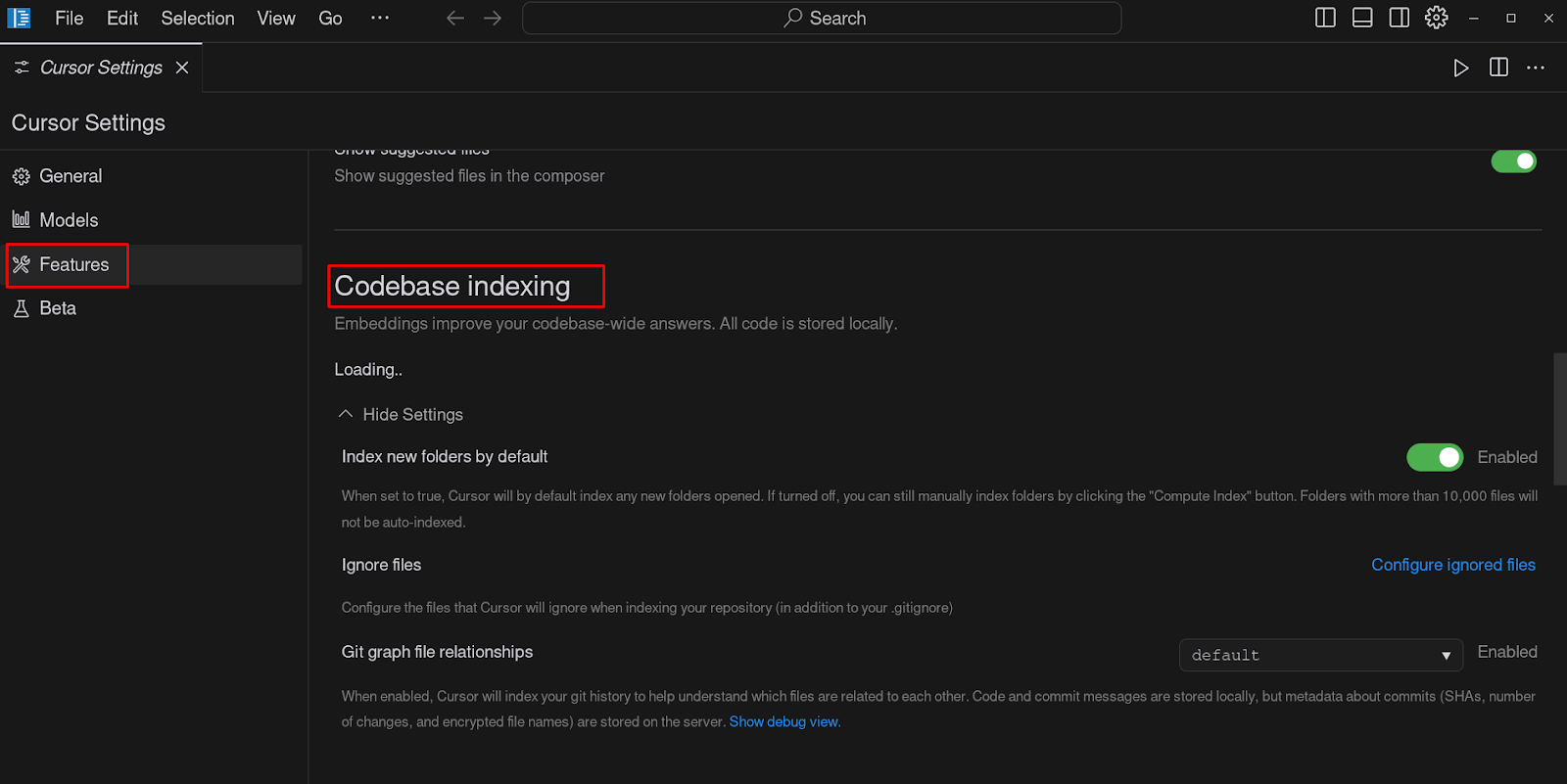
- Under the Codebase Indexing section, enable automatic indexing for all new repositories.
- If you have specific files or large datasets that the AI doesn’t need to analyze, you can configure the files that Cursor AI will ignore during indexing.
By indexing only the files relevant to your current project, you can improve the performance and speed of the AI. Indexing your codebase ensures that the AI has an up-to-date understanding of your project’s structure, classes, and functions. This means that when you ask for code generation or help with a particular task, Cursor AI is able to provide more informed and contextual responses.
Another aspect of codebase indexing is ensuring that large or unnecessary files are excluded. These can include datasets, backups, or old logs that are not relevant to your project. You can add such files to the ignore list under advanced settings, ensuring the AI’s focus remains where it is needed the most.
Writing Custom Instructions for AI
You can specify how Cursor AI should handle various tasks, such as formatting code, using specific variable naming conventions, and more. These instructions can include anything from how to write a particular function to broader organizational guidelines.
Example: If you’re working with React components, you might want to ensure that all component names follow the PascalCase convention.
These rules will guide the AI to generate better code and avoid common pitfalls like ambiguous or confusing names. Moreover, by using the same naming conventions and patterns across your project, you make your codebase more readable and maintainable, which is crucial for scalability.
How to Create Project Rules with .cursor/rules
Project-specific instructions used to live in a single .cursorrules file at the root of a project. Cursor still reads that file if it finds one, but it’s marked as legacy and is no longer the recommended approach. The current format is a .cursor/rules directory containing separate Markdown files with the .mdc extension, so a project can have several focused rule files instead of one long document.
Steps to Create Project Rules with .cursor/rules
- Create a .cursor/rules folder in the root of your project.
- Add a new file inside it, for example react-components.mdc.
- At the top of the file, add a short frontmatter block with a description field, an optional globs pattern for which files the rule applies to, and an alwaysApply flag.
- Below the frontmatter, write the instructions the same way you would in the User Rules section within settings.
Each rule file can also be set to one of four types, which controls when Cursor pulls it into context:
- Always: included in every request for that project.
- Auto Attached: only pulled in when a file matching the rule’s glob pattern is part of the conversation.
- Agent Requested: left out by default, and added when the AI decides the rule’s description matches the current task.
- Manual: only added when you reference the rule by name, for example @react-components.
A .cursor/rules folder can also sit inside a specific subdirectory, for example apps/api/.cursor/rules, and Cursor will only apply those rules to files inside that folder. This scoping is the main advantage over the old single .cursorrules file, which applied the same instructions to the whole project regardless of which part of the codebase you were working in.
If you’re migrating an existing .cursorrules file, split its content into a few focused .mdc files rather than keeping it as one long document; Cursor’s own guidance suggests keeping each rule file under roughly 500 lines. Teams that want something simpler than the full rule system can also add a plain AGENTS.md file at the project root, though it applies globally to the whole project and doesn’t support the per-folder scoping that .cursor/rules offers.
Practical Examples of Using AI Rules in Projects
To provide a clearer understanding of how to use AI rules effectively, here are some practical examples:
- Enforcing Folder Structure If your project requires a specific folder structure for organizing components and services, you can create rules that instruct Cursor AI to generate code files in those specific folders, ensuring a consistent architecture.
- Database Access Rules For a project that accesses a database, you might want to enforce a rule that ensures all database queries are written through a certain utility function, rather than directly in the code. This rule could help in maintaining security and preventing SQL injection attacks.
- Code Commenting Standards You can define a rule that ensures Cursor AI adds specific types of comments to generated code. For instance, instruct the AI to always add a TODO comment for each unimplemented function, or to add a brief description of each class and method it creates.
- State Management Guidelines If you are using a state management library like Redux, you can create rules that instruct the AI on how to create actions, reducers, and selectors, following your preferred conventions. This ensures that state management is handled consistently across your entire application.
Conclusion
Creating AI rules for Cursor AI offers a powerful way to streamline your development workflow. By defining clear instructions, you can ensure the AI generates code that is both accurate and consistent with your project’s needs. Whether through global User Rules or project-specific .mdc files in .cursor/rules, these customizable rules are a valuable tool for developers who want to make the most out of AI-driven coding.
Cursor AI continues to evolve as an indispensable tool for developers, and understanding how to tailor it through AI rules can enhance your productivity and code quality. Developers can create a smoother, more efficient coding experience, ultimately leading to better products and a more enjoyable development process.
Zooming out from any single tool: if you’re rethinking how your team builds software with AI in the loop, our breakdown of AI-first vs. traditional software development covers the bigger mindset shift behind it.
Looking to grow your engineering team? Rollout IT’s IT staff augmentation gives you senior developers on demand, embedded directly into your workflow.